

Why Are Ants Attracted to Electronics? Causes & Solutions
Quick Answer

Ants are attracted to electronics because they provide warmth, shelter, darkness, moisture, and sometimes nearby food sources. They are usually not interested in the electricity itself. Instead, devices like laptops, routers, gaming consoles, and TVs can create the perfect environment for ants to explore or hide.
The fastest way to solve the problem is to remove visible ants with compressed air safely, then eliminate the nearby colony using ant bait so they do not keep returning.
If you notice ants around your electronics, acting quickly can help prevent possible damage and stop the infestation from spreading.
In this guide, you’ll learn:
- Why ants are attracted to electronics
- Whether ants can actually live inside devices
- How to remove ants without damaging your equipment
- The best products to eliminate the colony
- How to prevent ants from coming back
Affiliate Disclosure: This page contains affiliate links. If you buy through my links, I may earn a small commission at no extra cost to you. As an Amazon Associate, I earn from qualifying purchases.
Recommended Solutions for Ants in Electronics
If you want a quick and effective solution, these are some of the most popular options homeowners use. Place indoor ant bait stations near areas where you notice ant activity to help stop ants from reaching your electronics and other valuable items.
| Product | Best For | Why It Works | Safety |
|---|---|---|---|
| Terro Liquid Ant Baits | Eliminating the colony | Worker ants carry bait back to the nest | Place away from electronics |
| Falcon Dust-Off Compressed Air | Removing ants from devices | Blasts ants out without liquids | Safe for electronics |
| Advion Ant Gel | Large infestations | Strong professional-style bait formula | Use carefully around pets and children |
Best Choices at a Glance
Best Overall: Terro Liquid Ant Baits — targets the colony instead of only killing visible ants.
Best for Ants Inside Devices: Falcon Dust-Off Compressed Air — removes ants without spraying liquids into electronics.
Best for Heavy Infestations: Advion Ant Gel — useful when standard baits are not enough.
Why Are Ants Attracted to Electronics?
Finding ants crawling across your laptop, router, or gaming console can be surprising. However, ants usually are not attracted to electronics because of the electricity.
They are looking for the same things they need anywhere else:
- Food
- Water
- Warmth
- Protection
- A safe place to hide
Electronic devices can accidentally provide several of these conditions at the same time.
Heat From Electronics Attracts Ants
Many electronics generate heat while operating.
Examples include:
- Laptops
- Routers
- Gaming consoles
- Desktop computers
- Televisions
Ants may investigate these warm areas because they provide shelter from cooler temperatures.
A router that stays warm 24/7 can become especially attractive because it offers a consistent environment.
Can Ants Actually Live Inside Electronics?
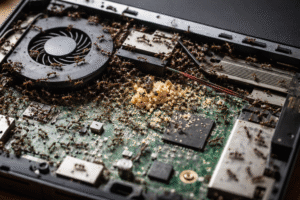
Yes, certain ants can temporarily hide or even establish nests inside electronic devices if conditions are right.
Ants are more commonly found around electronics rather than inside them, but severe infestations may lead them into:
- Laptop vents
- Keyboard openings
- Gaming consoles
- Power strips
- Routers
Dark, enclosed spaces provide protection from predators and disturbances.
Food Residue Around Devices
One of the biggest reasons ants appear around electronics is simple: food.
Small amounts of:
- Sugar
- Drink spills
- Snack crumbs
- Grease from hands
can attract worker ants.
A laptop used at a kitchen table or gaming setup surrounded by snacks is much more likely to attract ants than a clean device.
Moisture and Humidity
Ants need water to survive.
Although electronics are not a water source themselves, moisture can collect around devices because of:
- Humid rooms
- Condensation
- Nearby spills
- Poor ventilation
Areas with both warmth and moisture can become attractive hiding places.
Electrical Signals and Ant Behavior
Some people believe ants are attracted to electrical currents.
While certain insects may respond to environmental changes around electrical equipment, there is limited evidence that household ants are primarily attracted to electromagnetic fields.
In most homes, the main reasons are:
- Heat
- Shelter
- Food
- Moisture
Why You Shouldn’t Ignore Ants in Electronics
A few ants may seem harmless, but ignoring the problem can allow the infestation to grow.
Possible problems include:
- Ants blocking vents or openings
- Corrosion from moisture and debris
- Device overheating
- Electrical problems in severe situations
- Expensive repairs or replacement
Large infestations are uncommon, but dealing with ants early is much easier than waiting until they spread.
Signs Ants May Be Inside Your Electronics
Look for these warning signs:
- Ants entering or leaving vents
- Ant trails leading to devices
- Ants around charging ports
- Small piles of debris near electronics
- Dead ants near openings
- Strange overheating issues
- Unusual sounds coming from devices
Less Obvious Warning Signs
Some infestations are harder to notice.
Small Debris Around the Device
Ants may leave behind small particles of nesting material or debris near vents and openings.
Repeated Ant Trails
If ants keep returning to the same laptop, router, or power strip, there may be a nearby colony.
Burning Smell
A burning smell is uncommon but should always be taken seriously. Turn off and unplug the device if you notice unusual odors.
How to Remove Ants From Electronics Safely
Step 1: Unplug the Device
Before doing anything:
- Turn off the device.
- Disconnect the power.
- Move it away from other electronics if possible.
This reduces the chance of damage and makes inspection easier.
Step 2: Remove Visible Ants With Compressed Air
Best Choice: Falcon Dust-Off Compressed Air

Compressed air is one of the safest ways to remove ants from electronics because it does not introduce liquids.
Use it around:
- Keyboard gaps
- Vents
- Ports
- Openings
Avoid spraying liquid insecticides directly into electronics.
Liquids can damage internal components.
Recommended Product: Falcon Dust-Off Compressed Air
Step 3: Eliminate the Colony
Removing the ants you see is only part of the solution.
The colony is usually the real problem.
Best Overall: Terro Liquid Ant Baits

Ant baits work because worker ants carry the bait back to the colony.
This helps eliminate:
- Worker ants
- Hidden ants
- The queen
Place bait several feet away from the electronic device.
Do not place bait directly on your laptop, router, or other equipment.
Recommended Product: Terro Liquid Ant Baits
Step 4: Use a Stronger Option for Severe Infestations
If ants continue returning after using standard bait, consider:
Advion Ant Gel

Advion is often used for larger indoor ant problems because it contains a stronger bait formula.
Use it carefully and follow the label instructions.
Recommended Product: Advion Ant Gel
Step 5: Clean the Area
After removing the ants:
Clean the surrounding area to remove attractants.
Helpful options include:
- Electronics-safe screen cleaner
- Microfiber cloth
- Compressed air
- Gentle surface cleaning
Avoid spraying cleaners directly into device openings.
What Not to Do
Avoid these common mistakes:
❌ Do not spray insecticide inside electronics.
❌ Do not pour water into vents.
❌ Do not use liquid cleaners inside devices.
❌ Do not open devices if they are under warranty.
❌ Do not crush ants inside ports.
These methods can create more damage than the ants themselves.
How to Prevent Ants From Returning
Once the ants are gone, prevention is important.
Keep Electronics Clean
Regularly remove:
- Food crumbs
- Dust
- Sticky residue
Avoid Eating Near Devices
Gaming areas, desks, and workstations often attract ants because of hidden snack debris.
Control Moisture
Reduce humidity and clean spills quickly.
Seal Entry Points
Check for:
- Wall cracks
- Window gaps
- Door openings
Use Ant Baits During Activity Periods
If ants repeatedly appear, baiting nearby areas can help stop future invasions.
What To Use Based on Your Situation
Ants Inside a Laptop
Use:
Falcon Dust-Off Compressed Air
Best for safely removing ants without opening the device.
Ants Keep Returning
Use:
Best for eliminating the colony causing the problem.
Large Ant Infestation
Use:
Best for stronger control when regular bait is not enough.
Cleaning Around Electronics
Use:
Best for removing residue that attracts ants.
When Should You Call a Professional?
Consider professional pest control if:
- Ants return after multiple bait treatments
- Several electronics are affected
- You suspect ants are inside walls
- Ants are coming from electrical outlets
- The infestation keeps spreading
If electrical problems are occurring, an electrician may also be needed.
Frequently Asked Questions
Can ants damage electronics?
Yes, although serious damage is uncommon. Large infestations may contribute to overheating, blocked airflow, corrosion, or electrical issues.
Why do ants go into laptops and routers?
Ants are usually attracted by warmth, shelter, moisture, and nearby food sources.
Can I spray bug killer inside electronics?
No. Liquid insecticides can damage internal components.
What is the fastest way to remove ants from electronics?
Use compressed air to remove visible ants, then place ant bait nearby to eliminate the colony.
How long does it take to get rid of ants?
Small problems may improve within a few days. Larger infestations can take one to three weeks.
Is compressed air safe for electronics?
Yes. Compressed air is commonly used for cleaning electronics when used correctly.
Why are ants attracted to laptop chargers?
Chargers can produce heat, and they are often located near desks where crumbs and food residue accumulate.
Why do ants keep coming back to my electronics?
They usually return because the colony is still active or because food, moisture, or shelter is still available.
Related Guides
- How to Get Rid of Ants Naturally
- Why Are Ants Attracted to My Laptop?
- Best Indoor Ant Killers
- How to Find an Ant Nest in Your Home
- Ants in Electrical Outlets
Final Verdict: Remove the Ants Before They Spread
Ants around electronics are usually searching for warmth, shelter, moisture, or food—not electricity.
The best solution is a two-step approach:
✔ Remove ants safely with compressed air
✔ Eliminate the colony with ant bait
✔ Keep the area clean to prevent future problems
Recommended Solutions:
Terro Liquid Ant Baits
Best overall colony control
Falcon Dust-Off Compressed Air
Safest option for electronics
Advion Ant Gel
Best for severe infestations
Taking action early can protect your electronics and prevent a small ant problem from becoming a bigger infestation.




This was such an eye-opening read—most people don’t realize how common it is for ants to get into electronics until it happens to them!
Questions I’d ask after reading:
Are certain ant species more likely to invade electronics than others?
How long does it usually take for ants to cause serious damage inside a device?
Discussion:
I think it’s fascinating how ants are drawn to warmth and electrical fields. It shows how their natural instincts can clash with modern technology in unexpected ways. The point about electrical shorts and even fire risks really highlights why it’s so important not to ignore a few stray ants.
Experience:
I’ve dealt with this firsthand—years ago, I found ants inside my WiFi router. I didn’t realize until it started randomly shutting down. Cleaning it out with compressed air and using bait nearby eventually solved the problem, but it was such a hassle! Since then, I always keep food far from my desk.
Opinion:
Overall, this is a great article because it doesn’t just explain why ants show up—it gives clear, practical steps to handle them safely. I especially agree that prevention (keeping devices clean, using baits) is way easier than dealing with a full-blown infestation later.
Thanks for sharing such a detailed and helpful guide—this is the kind of info everyone with electronics should know about!
Not all species are attracted to electronics; the common ones that are attracted are crazy ants and fire ants. Within a few days or weeks, electronic devices can be damaged. I hope this helps.