How to Get German Roaches Out of a Gaming Console
PlayStation, Xbox & Other Gaming Systems
You finally get a few minutes to sit down and play your favorite game. You turn on your PlayStation or Xbox, grab the controller—and then notice a small brown insect disappear through one of the ventilation openings. Suddenly, your gaming session is over.
If that insect was a German cockroach, don’t panic and don’t reach for the bug spray. Spraying insecticide into an expensive gaming console can create a much bigger problem than the cockroach itself.
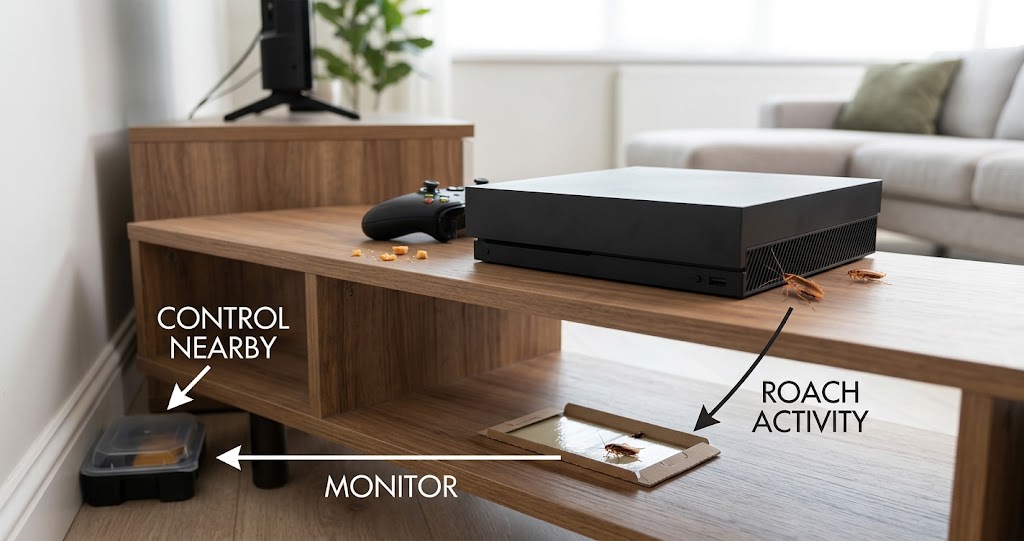
German cockroaches can take advantage of warm, dark and protected spaces inside homes, including areas around electronic equipment. Gaming consoles can be particularly concerning because they contain ventilation openings, tight internal spaces and sensitive electronic components that aren’t designed to come into contact with household pesticides or liquids.
The safest strategy is to control the cockroaches around the gaming system without treating the electronics themselves. This complete guide explains how to identify signs of German cockroaches in a PlayStation, Xbox or similar gaming system, what to do immediately, how to control the surrounding infestation, how to clean the console safely, when professional help makes sense, and how to prevent the problem from happening again.
Quick Answer: Turn off and unplug the console, allow it to cool, and do not spray anything into the vents. Inspect the gaming area for food, moisture and additional cockroach activity. Place monitoring traps and appropriately labeled bait around—not inside—the console, and clean the system only according to the manufacturer’s instructions. If there are strong signs of an internal infestation, professional inspection or replacement may be safer than attempting a DIY chemical treatment.
Disclosure: This article may contain affiliate links. If you purchase through one of these links, Bug Off Control may earn a commission at no additional cost to you.
As an Amazon Associate, Bug Off Control earns from qualifying purchases.
Best Products for German Cockroach Control Around Gaming Consoles
The safest approach is to keep pest-control products outside the electronic equipment.
| Product | Type | Best Use Around Gaming Area | Inside Console? | Best For |
|---|---|---|---|---|
| Advion Cockroach Gel Bait | Gel bait | Suitable cracks and crevices around the entertainment area | ❌ No | Targeted control |
| Combat Max Roach Killing Bait Stations | Enclosed bait | Near walls, furniture and cockroach travel routes | ❌ No | Convenient baiting |
| Catchmaster Glue Boards | Monitoring trap | Under or behind the entertainment center | ❌ No | Monitoring activity |
| Gentrol Point Source IGR | IGR | Appropriate locations around the infested area | ❌ No | Disrupting cockroach development |
| Compressed Air Duster | Cleaning tool | Approved external/accessibility cleaning areas | ⚠️ Only as manufacturer permits | Dust removal |
Bug Off Control Recommended
For a gaming setup, the best approach is generally monitoring + sanitation + targeted pest control around the equipment, rather than attempting to put insecticide inside the console.
Check Latest Price & Availability on Amazon
Product availability, formulations, prices and labels can change. Always read and follow the current manufacturer’s directions before using any pest-control product.
First: What to Do If You Just Saw a Roach Enter Your Console
If you just watched a German cockroach disappear into your PlayStation or Xbox, start here.
1. Stop using the console
Save your game if necessary, shut the system down normally, and disconnect it from power once it has safely shut down.
2. Let it cool
Don’t immediately move or clean a hot console.
3. Do not spray the vents
This is one of the biggest mistakes you can make.
Avoid:
- Cockroach spray
- Foggers
- Water
- Bleach
- Household cleaners
- Essential oils
- Gel bait
- Boric acid powder
None belong inside the console.
4. Clean the surrounding gaming area
Remove:
- Food crumbs
- Candy
- Soda
- Food wrappers
- Greasy residue
- Pet food
- Empty drink containers
5. Start monitoring
Place appropriately positioned glue boards around the entertainment center to determine whether more cockroaches are traveling through the area. This gives you a much better starting point than simply treating the one roach you saw.
Why Do German Cockroaches Get Into Gaming Consoles?
German cockroaches don’t specifically seek out PlayStations or Xboxes because they are gaming systems. Instead, a console can provide several characteristics that are useful to an insect looking for shelter.
Warmth
Gaming systems produce heat during operation. Warmth can make nearby protected areas more favorable, particularly when other conditions such as food and moisture are available.
Darkness
German cockroaches are primarily active at night. A dark electronic enclosure provides protection from light and normal household activity.
Shelter
Cockroaches prefer protected cracks and crevices. The internal spaces of electronics can provide numerous areas that are difficult for people to inspect.
Food Nearby
This is one of the biggest reasons a gaming area can become attractive. If you regularly eat while gaming, crumbs can accumulate:
- Under the console
- Behind the entertainment center
- Under the TV stand
- Between cables
- Along baseboards
- Inside drawers
The cockroaches don’t necessarily need to find food inside the console. Food nearby may be enough to keep them in the area.
Moisture Nearby
A gaming console located near a kitchen, bathroom or damp wall may also be exposed to an environment that supports cockroach activity.
How to Tell Whether Cockroaches Are Inside Your Console
Seeing one roach near your PlayStation doesn’t prove that it has established itself inside the system. Look for multiple clues.
Possible signs include:
- Cockroaches emerging from ventilation openings
- Repeated sightings around the same console
- Small dark droppings near vents
- Shed skins
- Egg cases
- A persistent musty or cockroach-like odor
- Nymphs around the gaming area
- Several roaches disappearing beneath or behind the console
- Activity that increases after the system has been operating
Nymphs are especially important
Finding small German cockroach nymphs can indicate that reproduction is occurring somewhere nearby. That doesn’t necessarily mean they’re breeding inside the console. The colony could be located:
- Behind the refrigerator
- Inside kitchen cabinets
- Under the sink
- Behind the stove
- Around plumbing
- Inside wall voids
- Behind other appliances
The console may simply be one of several hiding places.
Can German Cockroaches Damage a PlayStation or Xbox?
Yes, they can potentially contribute to equipment problems. Cockroaches can leave behind:
- Droppings
- Shed skins
- Body parts
- Food debris
- Other organic material
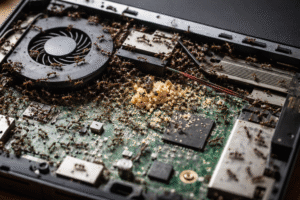
If enough contamination accumulates inside sensitive equipment, it may interfere with components or contribute to electrical and mechanical problems. A live insect can also become trapped in moving or electrical parts. However, don’t assume every console malfunction is caused by cockroaches. Overheating, dust, failing fans, damaged power supplies and normal hardware failure can produce similar symptoms. If your console is malfunctioning, have it properly diagnosed.
How to Get German Cockroaches Out of a Gaming Console
Step 1: Turn Off and Unplug the Console
If you suspect a cockroach has entered the system, shut it down and disconnect the power.
Also disconnect:
- HDMI cables
- USB accessories
- Ethernet cables
- External storage
- Charging accessories
Allow the console to cool completely before moving or cleaning it.
Step 2: Move It to a Clean, Dry Location
Move the console away from the area where you found the cockroach activity. Place it on a clean, dry surface with good lighting.
Avoid putting it:
- On the kitchen floor
- Near food
- Near a sink
- Beside garbage
- Against a damp wall
The objective is to separate the equipment from the immediate infestation while you investigate the source.
Step 3: Inspect the Outside of the Console
Use a flashlight to inspect:
- Ventilation openings
- Exterior seams
- Ports
- Bottom surfaces
- Cable areas
- The area underneath the console
Don’t insert tools into the openings. Don’t attempt to remove components unless you know exactly what you’re doing. Look for evidence rather than trying to physically chase the insect.
Step 4: Monitor the Area Where the Console Was Located
Place glue boards around the former console location. Useful locations may include:
- Behind the TV stand
- Under the entertainment center
- Along the wall
- Near baseboards
- Near cable-entry points
- Near nearby furniture
Don’t block ventilation openings with traps or other materials.
Why monitoring matters
If the traps catch additional cockroaches, you’ve learned something important: The console may not be the real source. There is likely continuing activity in the room or somewhere nearby.
Step 5: Control the Cockroaches Around the Console
Once you’ve identified the travel routes, use appropriate pest-control products according to their labels.
Gel bait
A product such as Advion Cockroach Gel Bait can be useful in appropriate cracks and crevices where cockroaches are active.
Enclosed bait stations
Products such as Combat Max can provide a contained baiting option where their label permits use.
Monitoring traps
Glue boards can help determine whether activity is decreasing.
IGR
An insect growth regulator such as Gentrol can be considered as part of a broader control program when appropriate.
The critical rule –All pest-control products stay outside the console.
Never turn the gaming system into the treatment site.
Step 6: Clean the Gaming Area Thoroughly
This step is easy to underestimate. Pull the entertainment center away from the wall if practical and clean underneath it.
Remove:
- Food crumbs
- Dust
- Wrappers
- Candy
- Dried drink residue
- Cardboard
- Clutter
Vacuum appropriate areas and dispose of collected debris promptly. Pay special attention to dark areas that rarely get cleaned.
Step 7: Remove Moisture Sources
Inspect the gaming room for water sources.
Check:
- Nearby plumbing
- Windows
- Condensation
- Damp baseboards
- Pet-water bowls
- Drinks
- Leaking appliances
- Damp flooring
If the gaming room shares a wall with a kitchen or bathroom, investigate that side of the home as well.
Step 8: Break the German Cockroach Breeding Cycle
If you’re seeing repeated German cockroach activity, controlling individual adults isn’t enough. You also need to reduce reproduction. An IGR can be useful as part of an integrated pest-management strategy. IGRs work differently from conventional insecticides by interfering with cockroach development and reproduction.
However, an IGR:
- Does not replace sanitation
- Does not replace baiting
- Does not remove the source
- Should not be placed inside electronics
Always follow the current product label.
Step 9: Clean the Console According to Manufacturer Instructions
Once the console is unplugged and completely cool, clean it only using methods approved by the manufacturer. For many systems, exterior dust removal can be performed carefully. Compressed air may be appropriate for certain cleaning tasks, but don’t assume that every method is safe for every console.
Avoid:
- Water
- Household cleaning sprays
- Insecticides
- Bleach
- Oil-based products
- Improvised chemicals
- Metal objects inserted into vents
If insects or contamination appear to be deep inside the system, professional cleaning is the safer option.
When Should You Have the Console Professionally Inspected?
Consider professional service if:
- You have repeatedly seen roaches coming from inside the console.
- There are visible droppings inside.
- You find an egg case.
- The console starts overheating.
- The fan behaves abnormally.
- The system shuts down unexpectedly.
- There is a persistent odor.
- You suspect significant internal contamination.
- You aren’t comfortable opening the equipment.
A qualified technician can determine whether the console needs internal cleaning, repair or replacement.
When Is Replacing the Console or Other Electronics Worth Considering?
Don’t automatically throw away an expensive PlayStation or Xbox because you saw one roach. But severe internal contamination can change the calculation. Replacement may become worth considering when:
- The equipment is heavily infested.
- Internal contamination is extensive.
- Repairs approach the cost of replacement.
- A technician determines that cleaning isn’t practical.
- The device continues malfunctioning after professional cleaning.
For inexpensive peripherals or older equipment, replacement may sometimes be more practical.
What NOT to Do
Don’t spray insecticide into the console
This can damage electronics and create unnecessary safety concerns.
Don’t pour water into it
Water and electronics are a dangerous combination.
Don’t put gel bait inside it
Gel belongs in appropriate pest-control locations—not on circuit boards or inside ventilation openings.
Don’t put loose boric acid inside it
Avoid introducing insecticide dust into sensitive electronic equipment.
Don’t use a fogger to treat the console
Foggers are not a precision treatment for electronics and can unnecessarily expose your home to pesticide.
Don’t heat the console to kill cockroaches
Deliberately overheating electronics can cause serious damage.
Don’t freeze the console
Putting a PlayStation or Xbox in a freezer can lead to condensation and electronic damage when it is brought back to room temperature.
Don’t block the vents
Your console needs proper airflow for cooling.
The Living Room Lockdown: Wall Outlets and Cable Openings
Your gaming setup may be connected to a larger cockroach problem. If the entertainment center is against a wall shared with a kitchen, bathroom or another apartment, inspect the surrounding area. German cockroaches can move through building gaps and openings.
Look around:
- Baseboards
- Cable plates
- Wall penetrations
- Gaps around pipes
- Furniture edges
- Cracks and crevices
Important electrical safety rule
Don’t inject pesticide into electrical outlets or switch boxes.
If you suspect insect activity inside an electrical box, have it evaluated safely by a qualified professional. For ordinary cracks and gaps, use appropriate sealing methods after determining that you aren’t sealing insects inside an active infestation.
Apartment and Condo Considerations
If you live in an apartment, condo or duplex, the problem may extend beyond your unit. German cockroaches can move through interconnected building spaces, particularly where there are gaps around plumbing, walls and utilities. If you’ve cleaned your gaming area and are still seeing repeated activity, the source may be:
- Another room
- Another apartment
- A shared wall
- Plumbing spaces
- Common building areas
Notify your landlord or property manager when appropriate. A recurring building-wide problem cannot always be solved from inside one room.
Don’t Forget Other Electronics
If cockroaches are getting into your gaming console, inspect other nearby equipment. Potential hiding locations include:
- TV stands
- Cable boxes
- Routers
- Modems
- Speakers
- Streaming devices
- External hard drives
- Power bricks
- Charging stations
- Game-storage cabinets
Again, don’t spray pesticides into these devices. Treat the surrounding environment instead.
PlayStation, Xbox and Nintendo Systems
The same general principles apply to most gaming electronics.
PlayStation
Whether you’re using a PS4 or PS5, don’t spray through the ventilation openings or attempt to chemically treat internal components.
Xbox
Xbox consoles also require proper airflow and contain sensitive electronic components. Don’t block the ventilation system or introduce liquids and pesticides.
Nintendo Switch
The Switch itself and its dock should also be treated as electronics. If you suspect cockroach activity around the dock, clean the surrounding area and monitor it rather than spraying into the dock.
Your Gaming Snacks Could Be Feeding the Problem
Let’s be honest: snacks and gaming often go together. Unfortunately, those crumbs can become a food source for cockroaches.
Try to keep:
- Chips
- Candy
- Cookies
- Pizza
- Soda
- Juice
- Pet food
away from the gaming station. If you eat while gaming, clean the area afterward. A quick vacuum around the entertainment center can make a surprisingly big difference.
🟢 Light, 🟡 Moderate and 🔴 Heavy Activity
🟢 Light Activity
You see an occasional cockroach but find little evidence of reproduction.
Focus on:
- Cleaning
- Monitoring
- Removing food
- Removing moisture
- Targeted baiting
🟡 Moderate Activity
You regularly see cockroaches or discover nymphs, droppings or shed skins.
Focus on:
- Multiple monitoring points
- Targeted baiting
- Thorough sanitation
- Moisture reduction
- Inspecting nearby appliances
- IGR where appropriate
- Locating the main harborage
🔴 Heavy Activity
You see numerous cockroaches, frequent nighttime activity, daytime sightings, many nymphs or repeated insects emerging from electronics.
Focus on:
- Comprehensive IPM
- Finding the primary infestation
- Monitoring throughout the home
- Properly placed bait
- Professional pest control when needed
- Professional inspection of heavily affected electronics
At this level, treating the console alone will not solve the problem.
How to Prevent German Cockroaches From Returning
Once you’ve dealt with the immediate infestation, protect the gaming area going forward.
Keep the area clean
Vacuum underneath and behind the entertainment center regularly.
Don’t leave food overnight
Especially snacks and open drinks.
Keep drinks away from electronics
This protects both your equipment and removes a potential moisture source.
Reduce clutter
Avoid piles of cardboard, paper bags and unused boxes around the gaming station.
Keep the console properly ventilated
Never cover or obstruct the manufacturer’s ventilation openings.
Monitor periodically
Glue boards can provide early warning of renewed activity.
Inspect nearby rooms
A clean gaming room won’t stay clean if the kitchen has an active German cockroach infestation next door.
A Simple Console Roach-Control Checklist
If you want the process condensed into one checklist:
☐ Turn off and unplug the console
☐ Let it cool completely
☐ Don’t spray anything into it
☐ Inspect the exterior
☐ Clean the gaming area
☐ Remove food and drinks
☐ Eliminate moisture
☐ Place monitoring traps around the entertainment center
☐ Use appropriate bait outside the console
☐ Investigate nearby appliances and cabinets
☐ Consider an IGR for established activity
☐ Clean the console only according to manufacturer instructions
☐ Seek professional inspection for significant internal infestation
☐ Continue monitoring after treatment
Related German Cockroach Guides
If German cockroaches have reached your gaming setup, they may also be hiding in other warm appliances and electronics. Continue investigating with these related guides:
- How to Get German Cockroaches Out of a Microwave
- How to Get German Cockroaches Out of a Coffee Maker
- How to Get Rid of German Cockroaches in Your Refrigerator
- How to Get Rid of German Cockroaches in Your Car
- How to Get German Cockroaches Out of a Toaster
Frequently Asked Questions
1. Can German cockroaches live inside a PlayStation or Xbox?
Yes. Gaming consoles can provide protected spaces where cockroaches may hide, particularly when an infestation is already present nearby. However, finding a cockroach near a console doesn’t automatically mean a colony is living inside it.
2. Should I spray cockroach killer into my PlayStation?
No. Household insecticides should not be sprayed into the ventilation openings or internal components of a gaming console. Treat the surrounding infestation instead.
3. Can I put cockroach gel bait inside my Xbox?
No. Keep gel bait and other pesticides outside the console and use them only in locations permitted by the product label.
4. What should I do if a cockroach crawls out of my console?
Turn the system off, unplug it once it has safely shut down, and allow it to cool. Inspect the console and surrounding area, then begin monitoring for additional activity.
5. Can cockroaches damage a gaming console?
They can potentially contribute to contamination and equipment problems. Droppings, shed skins, insects and other debris can accumulate inside electronics and may interfere with components.
6. Should I take my PlayStation apart?
Not unless you are experienced with electronics and understand the risks. If there is significant evidence of internal infestation, professional inspection and cleaning are safer options.
7. Will compressed air remove cockroaches?
Compressed air can help remove dust and debris from appropriate areas, but it should not be considered a reliable cockroach treatment. Follow the manufacturer’s cleaning instructions.
8. Can German cockroaches lay eggs inside a gaming console?
They can potentially use protected electronic spaces for harboring and reproduction. Finding nymphs or an egg case around the console is a strong reason to investigate the larger infestation.
9. Why do cockroaches keep coming back to my gaming setup?
The console may simply be one stop along their travel route. Food crumbs, moisture, clutter and nearby hiding places can keep attracting cockroaches to the area.
10. How do I permanently keep German cockroaches out of my gaming console?
No method can guarantee permanent exclusion. The best long-term strategy is to control the larger infestation, remove food and moisture sources, keep the gaming area clean, monitor activity and address potential entry and hiding places.
Conclusion
A German cockroach crawling out of your PlayStation or Xbox is enough to ruin anyone’s gaming session. But don’t panic—and don’t spray the console. Your gaming system is valuable electronics, not a surface for household insecticide. The safest strategy is to work from the outside in:
Unplug and inspect the console. Clean the gaming area. Remove crumbs and moisture. Monitor the entertainment center. Use appropriately placed cockroach bait around the room. Investigate nearby appliances and potential travel routes. And if there is evidence of serious internal contamination, have the console professionally inspected.
Most importantly, remember that the console may not be where the infestation started. It could simply be one of several warm, protected locations the cockroaches are using. Find the food, water, shelter and travel routes, and you’ll have a much better chance of stopping the problem at its source. Then you can get back to what you actually wanted to do in the first place: gaming—not hunting cockroaches.
Bug Off Control Tip
If you regularly eat while gaming, make cleaning underneath and behind your entertainment center part of your routine. A few minutes of cleanup can remove food sources that make the area more attractive to German cockroaches.