The Complete Guide to Pests in Home Electronics

Why ants, cockroaches, and other pests enter electronics—and how to protect your devices without making the problem worse
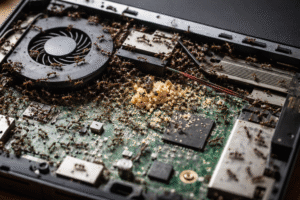
Finding an ant crawling across your laptop is annoying. Finding a German cockroach disappear into your gaming console can be downright alarming. But before you reach for an insecticide spray, take a breath.
Electronics can sometimes provide pests with warmth, darkness, shelter, and protected spaces, but the device itself usually isn’t the entire problem. In many cases, pest activity around electronics is a sign that ants, cockroaches, or other insects are already present somewhere nearby.
That means the best solution isn’t simply getting one insect out of a device. You also need to understand why pests are there, where they may be coming from, and how to control the surrounding environment without damaging your equipment.
This complete guide explains which electronics are most vulnerable, the pests you may encounter, warning signs of internal activity, what to do when you find pests, what you should never do, and how to reduce the chance of the problem returning.
Quick Answer: Why Do Pests Get Inside Electronics?
Pests may enter electronics because the equipment can provide a combination of conditions they naturally find useful:
- Warmth from operating components
- Darkness inside enclosed spaces
- Shelter from people and predators
- Small gaps and openings for access
- Nearby food or crumbs
- Moisture in the surrounding environment
- Protected locations that aren’t disturbed often
The important point is that electronics don’t necessarily “attract” insects like a food source does. Instead, a warm electronic device located in an area where pests already exist can become a convenient place to hide.
At a Glance: Pests and Electronics
Use this quick-reference guide to identify the most common situations. Remember: This is a practical reference, not a guarantee that a particular device will attract or harbor a particular pest. Conditions vary by pest species, climate, device design, cleanliness, and the surrounding environment.
Why Electronics Attract Cockroaches and Ants

Electronics don’t necessarily attract cockroaches and ants simply because they are electronic. What makes some devices appealing is the environment they can create around and inside them.
A warm, dark device with protected spaces, nearby food residue, moisture, and small openings can provide conditions that certain pests find useful for shelter.
The Attraction Equation
Warmth + Darkness + Shelter + Food Residue + Moisture + Small Gaps = More Attractive Pest-Hiding Conditions
Not every device has all of these conditions, and the presence of one factor does not mean an infestation will occur. However, several factors together can make an area more appealing to pests.
Warmth
Many electronics generate heat during operation. Gaming consoles, computers, routers, televisions, coffee makers, and other equipment may remain warm for extended periods.
Cockroaches in particular can take advantage of warm, protected areas when suitable shelter is available.
Darkness
Cockroaches and many other pests prefer protected areas away from light and regular activity. The enclosed spaces inside or underneath electronic equipment can provide shelter that is difficult to see without moving or inspecting the device.
Shelter
Electronics often contain seams, gaps, ventilation areas, and other protected spaces. Pests may use nearby protected areas for hiding even when they are not actually living inside the device.
Food Residue
Food particles can make electronics and the areas surrounding them more attractive. This is especially relevant around:
- Gaming areas where people eat snacks
- Computer desks
- Coffee makers
- Microwaves
- Kitchen appliances
- Entertainment centers
Even small amounts of crumbs or residue can contribute to pest activity when other favorable conditions are present.
Moisture
Some pests are attracted to areas where moisture is available. Coffee makers, kitchen appliances, refrigerators, plumbing areas, and equipment located near condensation or leaks can provide more favorable conditions. Fixing the source of moisture is usually more useful than simply treating the insects that appear around it.
Small Gaps and Openings
Small cracks, seams, ventilation openings, and spaces underneath equipment can provide access to sheltered areas.
However, an opening does not automatically mean pests will enter the device. Pest activity depends on the species, surrounding conditions, access, and availability of food and shelter.
Why the Surrounding Environment Matters Most
The most important point to remember is that electronics are usually part of the environment—not necessarily the source of the infestation.
If cockroaches are already established in a kitchen, bedroom, office, or entertainment area, they may eventually explore nearby electronic equipment because it provides warmth or shelter.
Likewise, ants may investigate electronics when they are searching for food, water, warmth, or protected nesting locations. That’s why controlling pests around the equipment is just as important as inspecting the equipment itself.
Key takeaway: Electronics don’t create a pest infestation by themselves. They can become attractive hiding places when warmth, darkness, shelter, food, moisture, and access come together in an environment where pests are already present.
Which Electronics Are Most Vulnerable to Pests?
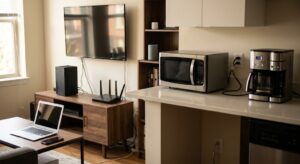
Not every electronic device is equally likely to attract or shelter insects. Devices that stay warm, have ventilation openings, contain protected spaces, or are located near food and moisture can provide better hiding conditions than others.
Use this quick guide to see which electronics deserve the closest inspection first.
🔴 Higher Concern
Gaming consoles • Desktop computers • Microwaves • Coffee makers
These devices can provide a combination of warmth, enclosed spaces, ventilation openings, food residue, or moisture that may make them more attractive to cockroaches and ants. Pay particular attention to areas around vents, openings, underneath the equipment, and nearby hiding places.
🟡 Moderate Concern
Wi-Fi routers • Modems • Televisions • Printers
These devices may stay warm for extended periods and often have small openings that can provide sheltered spaces. Regular inspection is especially worthwhile when you are already seeing pest activity nearby. Look for insects, droppings, shed insect material, or repeated activity around vents and openings.
🟢 Lower Concern
Power strips • Smart-home hubs • Devices with fewer openings
These devices generally provide fewer opportunities for pests to enter and establish themselves. However, they can still become attractive when there is an existing infestation or when food, moisture, dust, and debris accumulate nearby. Check the surrounding area regularly, particularly if you are already seeing ants or cockroaches in the room.
Important Reminder
These categories are general risk levels, not guarantees. A lower-concern device can still have pest activity, while a higher-concern device may never develop a pest problem.
The biggest factors are usually the type of pest, temperature, available food and moisture, hiding spaces, and whether there is already an infestation nearby.
Electronic Devices That May Harbor Pests
The table below provides a closer look at the electronic devices you may encounter, the pests that may be associated with them, why the area can be attractive, and the warning signs to watch for.
Electronic Devices That May Harbor Pests
Some household electronics provide exactly the conditions certain insects look for: warmth, darkness, shelter, food residue, moisture, and small protected spaces. The table below highlights common devices that may attract pests and the warning signs worth watching for.
Electronic Devices and Appliances That Can Harbor Pests
Cockroaches, ants, and other small pests can sometimes find their way into warm, dark, enclosed spaces inside household electronics and appliances. These areas can provide shelter from light and disturbances, while heat from operating equipment may make them especially attractive.
The table below highlights common devices that may experience pest activity, what can attract pests, and the warning signs worth watching for.
| Device or Appliance | Pests You May Encounter | Why Pests May Be Attracted | Warning Signs |
|---|---|---|---|
| Gaming Consoles | German cockroaches, ants | Warmth, darkness, ventilation openings, and enclosed spaces | Droppings, insects, unusual odors, or activity around vents |
| Desktop Computers | Cockroaches, ants | Heat, ventilation openings, and protected interior spaces | Insects near vents, droppings, or repeated pest activity |
| Laptops | Ants, small insects | Warmth, small gaps, keyboard openings, and sheltered spaces | Insects near the keyboard, vents, ports, or underside |
| Wi-Fi Routers | Ants, small insects | Continuous warmth and small sheltered openings | Insects or activity around vents and ports |
| Modems | Ants, cockroaches | Warmth, darkness, and enclosed spaces | Droppings, insects, or activity near openings |
| Televisions | Cockroaches, ants | Warm internal components and dark enclosed areas | Insects, droppings, or activity around ventilation openings |
| Microwaves | Cockroaches, ants | Food residue, warmth, moisture, and enclosed spaces | Droppings, insects, or activity underneath and around the unit |
| Refrigerators | Cockroaches | Food sources, moisture, warmth, and sheltered areas underneath or behind the appliance | Cockroaches, droppings, egg cases, or activity behind or beneath the refrigerator |
| Coffee Makers | Cockroaches, ants | Food residue, warmth, moisture, and dark spaces | Insects, droppings, or activity around and underneath the machine |
| Printers | Cockroaches, ants | Warmth, darkness, paper debris, and enclosed areas | Droppings, debris, insects, or activity around openings |
| Power Strips | Ants, small insects | Small gaps, warmth, and protected spaces | Insects around the casing, outlets, switches, or cords |
| Smart-Home Hubs | Ants, small insects | Continuous operation, warmth, and ventilation openings | Insect activity around vents, ports, or openings |
Why These Devices Can Become Pest Hiding Places
Most electronics are not attractive to pests because of the electronics themselves. Instead, warmth, darkness, shelter, and access to food or moisture nearby can make certain devices convenient hiding places.
Cockroaches are particularly concerning because they can squeeze through surprisingly small openings and may remain hidden inside equipment during the day. Ants can also investigate electronics when food odors, moisture, or suitable nesting conditions are nearby.
However, finding a pest near an electronic device does not automatically mean the insect is living inside it. The device may simply be located along an established travel route.
Warning Signs You Shouldn’t Ignore
Pay closer attention when you notice:
- Live or dead insects around ventilation openings
- Cockroach droppings near or beneath a device
- Egg cases or shed insect skins
- An unusual pest-related odor
- Repeated insect activity around the same equipment
- Ants entering through ports, seams, or small openings
- Pest debris accumulating around the device
- Multiple devices showing signs of activity
If you suspect pests have entered an electronic device, do not spray insecticide, water, or household cleaners directly into the equipment. Chemicals and moisture can damage sensitive components and may create an electrical hazard.
Instead, focus on controlling the pests around the device, removing nearby food and moisture sources, improving sanitation, and using appropriately placed monitoring traps or pest-control products according to their labels.
Important: If you see significant cockroach activity inside an electronic device, especially one that is powered on or connected to electricity, consider having the equipment inspected by a qualified technician before opening or servicing it yourself.
How to Tell If Bugs Are Actually Inside Your Electronics
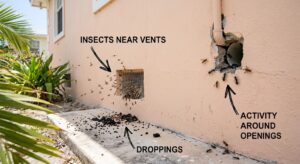
Seeing an ant, cockroach, or another insect near an electronic device does not automatically mean it has gotten inside. The insect may simply be passing through the area or looking for food, water, or shelter nearby.
However, certain warning signs can suggest that pests have entered the equipment or are using the area around it as a hiding place.
Signs to Look For
Insects emerging from vents or openings
If you repeatedly see insects coming out of ventilation slots, ports, seams, or other openings, the device deserves closer attention. Avoid putting your fingers or tools inside the equipment to investigate.
Repeated activity around the same device
One insect may be incidental. Seeing ants or cockroaches around the same gaming console, router, computer, TV, or appliance repeatedly is more concerning, especially when the activity continues after the surrounding area has been cleaned.
Droppings near openings
Cockroach droppings can appear as tiny dark specks or smears. Finding them around vents, seams, or underneath a device can be a warning sign of nearby pest activity.
Shed insect skins
Some insects leave behind shed skins as they develop. Finding these around or underneath electronic equipment can indicate that insects have been using the area as a hiding or nesting location.
Egg cases or other insect evidence
Egg cases, dead insects, body parts, or other pest evidence around a device should not be ignored. Multiple signs together are more meaningful than finding a single insect.
An unusual pest-related odor
A persistent musty or unpleasant odor around an electronic device can sometimes accompany a significant insect presence. However, unusual odors can also have electrical or mechanical causes, so do not assume the smell is caused by pests.
Insects appearing when the device warms up
Warm electronics can provide shelter for some insects. If pest activity seems to increase after a device has been operating for a while, inspect the surrounding area carefully once the equipment has been safely turned off and unplugged.
Pest activity underneath or behind the equipment
Cockroaches and ants may hide beneath, behind, or beside electronics rather than inside them. Activity in these areas can still be important because pests nearby may eventually find openings into the equipment.
A Single Bug Does Not Always Mean an Infestation
It’s important not to jump to conclusions. Finding one ant beside your Wi-Fi router or one cockroach near a television does not prove that insects are living inside the device.
Instead, look for a pattern of activity.
Repeated insects, droppings, shed skins, egg cases, or activity around openings provide a stronger reason to investigate. If several electronic devices in the same room show signs of pest activity, the problem may be larger than one piece of equipment.
What to Do If You Suspect Pests Are Inside
Do not spray insecticide, pour liquid, or insert objects into the device to force insects out. These actions can damage sensitive components and may create an electrical or fire hazard.
If practical, turn the equipment off, disconnect it from power, and leave internal inspection or repair to a qualified electronics or appliance professional when necessary.
At the same time, inspect the surrounding area for the conditions that may be attracting pests, including food residue, moisture, clutter, cracks, gaps, and other nearby hiding places.
Important: If you notice burning smells, sparks, damaged wiring, overheating, smoke, or other signs of electrical damage, stop using the equipment and seek appropriate professional assistance. Pest control should never take priority over electrical safety.
Why These Warning Signs Matter
Finding a single insect near an electronic device does not automatically mean pests are living inside it. However, repeated activity, droppings, unusual odors, shed insect parts, or insects appearing from vents and openings can indicate that the surrounding area deserves closer inspection.
If you suspect pests have entered an electronic device, do not spray insecticide directly into the equipment. Chemicals and liquids can damage sensitive components and may create an electrical or fire hazard. Instead, focus on identifying the source of the infestation, removing nearby food and moisture sources, and using appropriate pest-control methods around the device.
The Electronics Pest Problem: A Simple Way to Understand It
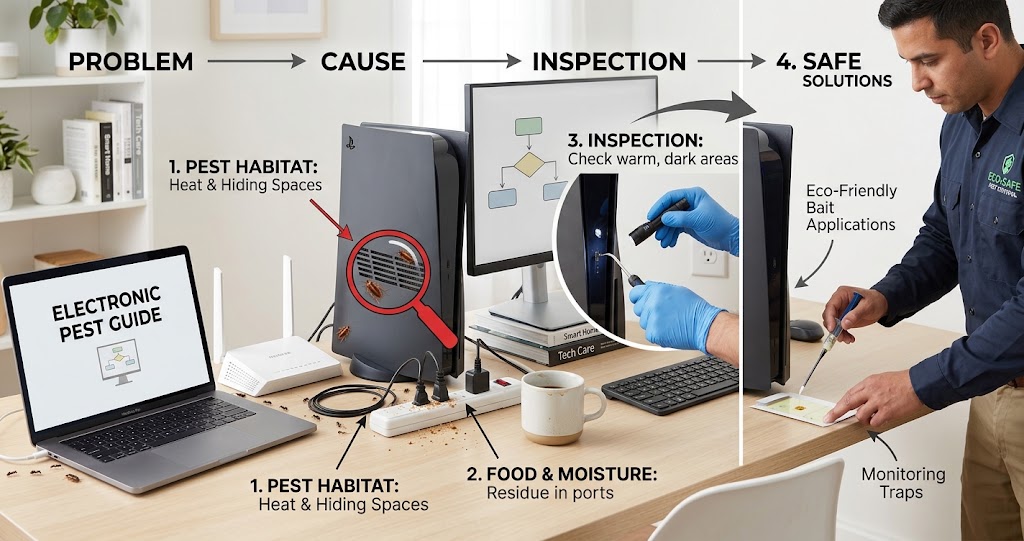
Think of the situation as three connected pieces:
1. The Pest
Cockroach, ant, or another small insect.
↓
2. The Environment
Food, moisture, warmth, clutter, shelter, and entry points.
↓
3. The Electronic Device
A warm, protected object that may provide additional hiding space. The device may be part of the problem—but it may not be the source of the problem. This distinction is important because removing or treating the device alone may not stop the infestation.
Which Electronics Are Most Vulnerable?

There isn’t one universal “most attractive” electronic device for pests. Risk depends on the combination of:
Warmth + openings + location + surrounding pest activity + food/moisture conditions
However, devices that operate for long periods and contain ventilation openings can provide more opportunities for insects to enter.
Higher Concern Situations
These deserve closer attention when pest activity is already present:
- Gaming consoles
- Desktop computers
- Routers and modems
- Televisions
- Microwaves
- Refrigerators and nearby mechanical areas
- Printers
Moderate Concern Situations
These can also experience pest activity depending on location and conditions:
- Laptops
- Coffee makers
- Smart-home hubs
- Cable boxes
- Game accessories
- Speakers
The Environment Matters More Than the Device
A router sitting on a clean office shelf isn’t necessarily a pest magnet. A router sitting beside food crumbs, clutter, moisture, and an established ant trail is a different situation.
Where the device is located can be just as important as the device itself.
Why Do Cockroaches Enter Electronics?
German cockroaches and other cockroach species are attracted to environments that provide suitable shelter, food, moisture, and favorable temperatures. Electronics can sometimes provide one piece of that puzzle.
Warmth
A device that operates continuously can produce heat.
Darkness
Cockroaches are generally more active during periods of darkness and can use hidden spaces for shelter.
Protection
The inside of a device can be relatively protected from normal household activity.
Nearby Food
A gaming console beside a snack-filled desk or a computer in a kitchen may be located close to food residues.
Existing Infestation
This is the biggest factor to remember. If cockroaches are already living in the room, they may eventually investigate nearby electronics.
Why Do Ants Enter Electronics?
Ant behavior can be somewhat different. Depending on the species and circumstances, ants may enter electronics while searching for:
- Food
- Moisture
- Warmth
- Shelter
- Suitable nesting conditions
If you repeatedly see ants around an electronic device, don’t immediately assume they are living inside it. Instead, watch their movement.
Where are they coming from?
Following an ant trail can sometimes lead you to a crack, wall opening, food source, plant, moisture source, or other area that needs attention.
Common Warning Signs of Pests Inside Electronics
One insect passing near a television doesn’t automatically mean the television is infested. Look for multiple signs.
1. Repeated Insect Sightings
You repeatedly see ants or cockroaches around the same device.
2. Insects Emerging From Openings
Seeing insects come from ventilation openings or seams is more concerning than finding one nearby.
3. Droppings
Small dark specks around or underneath equipment can be consistent with cockroach activity.
4. Egg Cases
Cockroach egg cases can indicate that cockroaches have been using the surrounding area for some time.
5. Shed Skins or Insect Remains
These can be additional signs of ongoing activity.
6. Persistent Odor
Heavy cockroach activity can sometimes be associated with an unpleasant or musty odor.
7. Repeated Activity at Night
Cockroaches are generally more active at night, so evening or nighttime sightings can be particularly informative.
8. Multiple Devices Are Affected
If insects are appearing around several electronic devices, think beyond one piece of equipment. You may be dealing with a broader pest problem.
What To Do If You Find a Pest Inside Electronics
The safest response is controlled rather than rushed.
Step 1: Stop Using the Equipment
If you strongly suspect insects have entered the device, stop using it. If it can be safely unplugged, disconnect it according to the manufacturer’s instructions.
Do not handle damaged electrical cords or exposed wiring.
Step 2: Isolate the Device When Practical
Keep the suspected equipment away from other electronics and areas where food is prepared. Avoid carrying heavily infested equipment throughout your home.
Step 3: Don’t Shake the Equipment Indoors
Shaking, banging, or striking a device can cause insects or debris to spread into the surrounding area. It can also damage the equipment.
Step 4: Inspect the Surrounding Area
Check:
- Under furniture
- Behind cabinets
- Along baseboards
- Around power cords
- Under desks
- Behind appliances
- Around food-storage areas
The goal is to determine whether the device is an isolated issue or part of a larger infestation.
Step 5: Monitor the Area
Glue boards and other appropriate monitoring traps can help determine whether pests remain active around the equipment. Place monitoring devices near suspected activity—not inside the electronics.
Step 6: Remove Conditions That Support Pest Activity
Look for:
- Food crumbs
- Grease
- Standing water
- Leaks
- Clutter
- Cardboard
- Accessible garbage
- Gaps around walls or cabinets
Step 7: Address the Pest Infestation
Depending on the pest, appropriate control may include:
- Sanitation
- Monitoring
- Baiting
- Removing food sources
- Correcting moisture problems
- Reducing clutter
- Sealing suitable entry points
- Professional pest control
Step 8: Have Valuable Equipment Inspected
If you believe pests have established themselves inside an expensive electronic device, professional inspection or electronics servicing may be safer than opening it yourself.
Do This vs. Don’t Do This
DO
✓ Stop using equipment when internal infestation is suspected
✓ Disconnect equipment safely when appropriate
✓ Inspect the surrounding area
✓ Look for the source of pest activity
✓ Use monitoring traps nearby
✓ Remove food and moisture sources
✓ Reduce clutter
✓ Follow manufacturer instructions
✓ Seek professional help when electrical hazards are involved
DON’T
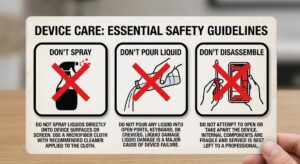
✗ Spray insecticide into ventilation openings
✗ Pour water or pesticide into electronics
✗ Shake heavily infested equipment indoors
✗ Open unfamiliar equipment
✗ Insert tools into electrical components
✗ Spray electrical outlets or power strips
✗ Assume one dead insect means the infestation is gone
✗ Ignore repeated pest activity
Never Spray Insecticide Into Electronics
This deserves its own section because it is one of the most important safety points in this entire guide. When a cockroach disappears into a gaming console, the natural reaction may be: To Spray it!
Don’t.
Household pesticides are formulated for specific applications. Electronics are not automatically safe places to apply them.
Spraying inside a device can potentially:
- Damage sensitive components
- Leave unwanted residue
- Create additional hazards
- Contaminate the equipment
- Push pests deeper into inaccessible areas
- Fail to address the surrounding infestation
Control the pest environment around the equipment rather than improvising with pesticides inside the equipment.
Always follow the product label.
Device-Specific Safety Guide
Different electronic devices have different safety concerns when pests are found nearby or suspected inside. The safest approach is to avoid putting pesticides or liquids inside the equipment and start with the least invasive inspection possible.
Use this quick reference before handling a device.
| Device | First Step | Main Safety Concern |
|---|---|---|
| Gaming Console | Turn it off, disconnect power, and inspect the exterior and surrounding area | Heat, ventilation openings, and electrical components |
| Laptop | Shut it down, disconnect the charger, and inspect the exterior | Battery, heat, and sensitive internal components |
| Wi-Fi Router | Disconnect power before inspecting the exterior and nearby area | Electrical components and ventilation openings |
| Microwave | Unplug it and inspect only the exterior and surrounding area | High-voltage components |
| Refrigerator | Inspect around, underneath, and behind the unit when safely accessible | Electrical components, compressor heat, and moving equipment |
| Coffee Maker | Unplug it and clean the surrounding area according to the manufacturer’s instructions | Moisture, electricity, and food residue |
⚠️ Special Warning About Microwaves
Do not open or dismantle a microwave yourself to look for cockroaches, ants, or other insects.
Microwaves contain high-voltage electrical components that can remain dangerous even after the appliance has been unplugged. Trying to reach insects inside the appliance can create a serious electrical hazard.
If you suspect that pests have established themselves inside a microwave, leave the internal inspection and repair to a qualified appliance technician.
You can safely focus on inspecting the outside of the microwave, the area underneath it, nearby cabinets, walls, floors, and other locations where pests may be hiding.
A Safer Approach for Other Electronics
For devices such as gaming consoles, laptops, routers, and similar equipment, begin with the exterior and surrounding area.
Look for:
- Insects around vents and openings
- Droppings or insect debris
- Activity underneath or behind the device
- Food residue or crumbs
- Moisture or water sources
- Cracks and nearby hiding places
- Repeated pest activity
If the equipment shows signs of burning, sparking, smoke, damaged wiring, overheating, or other electrical problems, stop using it and seek professional assistance.
Remember: Pest control and electronics repair are two different jobs. Control the pest problem around the equipment, and let a qualified technician handle potentially dangerous internal electrical work.
Device-by-Device Pest Guide
1. Gaming Consoles
PlayStation, Xbox, Nintendo systems, and gaming PCs can operate for long periods and generate heat. They also contain ventilation openings and internal spaces. If cockroaches are appearing around a gaming system:
- Stop using it.
- Disconnect it safely.
- Inspect the surrounding area.
- Look for droppings and other signs.
- Monitor nearby pest activity.
- Address the surrounding infestation.
- Consider professional inspection if internal infestation is suspected.
Related Guide
How to Get Rid of German Cockroaches in Gaming Consoles
2. Desktop Computers
Desktop computers contain fans, ventilation openings, and components that generate heat. If insects are appearing around a desktop:
- Remove food from the workstation.
- Clean the surrounding area.
- Inspect underneath the desk.
- Look for ant trails or cockroach evidence.
- Monitor nearby activity.
- Avoid spraying inside the computer.
If the computer is malfunctioning or electrical damage is suspected, use a qualified technician.
3. Laptops
Laptops are compact but still contain openings and components that generate heat. Ants may sometimes investigate laptops, particularly when food or moisture is nearby. Keep food away from the computer and regularly clean the surrounding work area.
Related Guide
How to Get Ants Out of a Laptop
4. Wi-Fi Routers and Modems
Routers often remain powered continuously, so they may stay warm for long periods. If ants are repeatedly appearing around a router:
- Follow the ant trail.
- Inspect nearby walls and baseboards.
- Look for moisture.
- Check for food sources.
- Monitor activity.
- Avoid spraying the router.
Related Guide
How to Get Ants Out of a Wi-Fi Router
5. Televisions
Televisions can provide dark internal spaces and ventilation openings.
The entertainment center around the television may also create hiding places.
Keep:
- Cables organized
- Food away from the area
- Dust and clutter under control
- The area accessible for inspection
Related Guide
6. Microwaves
Microwaves deserve extra attention because they are commonly used around food. Food residue and crumbs can contribute to pest activity in the surrounding area. Never spray pesticide inside a microwave. If you suspect cockroaches are inside, stop using the appliance and follow the manufacturer’s guidance or seek professional service.
Related Guide
How to Get German Cockroaches Out of a Microwave
7. Refrigerators
Cockroaches may be found around refrigerators because food is nearby and certain areas around the appliance can remain warm.
Inspect:
- Underneath the refrigerator
- Behind the refrigerator
- Around nearby cabinets
- Along the floor
- Around wall gaps
Do not spray pesticide into electrical or mechanical components.
Related Guide
How to Get Rid of German Cockroaches in Your Refrigerator
8. Coffee Makers
Coffee makers combine warmth, moisture, and food residue. That combination can make the surrounding area worth monitoring when pests are already present. Clean the appliance according to its manufacturer’s instructions and keep the surrounding counter free of spills and crumbs.
Related Guide
How to Get German Cockroaches Out of a Coffee Maker
9. Printers
Printers can generate heat and contain enclosed spaces. Keep paper-storage areas clean and avoid storing food near the printer. If insects repeatedly emerge from the printer, stop using it and consider professional inspection.
10. Power Strips and Electrical Equipment
Power strips and cable bundles can create protected spaces. If you see insects around a power strip:
Do not spray it.
If there are signs of electrical damage, burning, melting, exposed wiring, or unusual heat, stop using the equipment and replace it or have it professionally inspected.
11. Smart-Home Devices
Smart speakers, hubs, cameras, and other connected devices can remain powered for long periods. If pests are repeatedly appearing around them, inspect the surrounding environment for:
- Food
- Moisture
- Pest trails
- Cracks
- Clutter
Related Guide
How to Get Ants Out of a Security Camera
Can Pests Damage Electronics?
They can potentially contribute to equipment problems, but the outcome depends on the pest, device, infestation, and circumstances.
Possible concerns include:
- Contamination
- Debris
- Odors
- Physical interference
- Damage to certain materials
- Electrical problems in severe cases
However, don’t automatically blame insects when an electronic device malfunctions. Overheating, component failure, power problems, software issues, and normal wear can produce similar symptoms.
Can Cockroaches Actually Live Inside Electronics?
Yes, cockroaches can sometimes use electronics as sheltered harborage. But there’s an important distinction: The device may be the hiding place—not the source of the infestation. If cockroaches repeatedly appear inside one electronic device, inspect the surrounding environment.
Look for activity around:
- Cabinets
- Walls
- Floors
- Appliances
- Furniture
- Food-storage areas
- Plumbing
Controlling the broader infestation is usually more useful than focusing exclusively on the device.
Can Ants Nest Inside Electronics?
In some circumstances, ants can establish activity within or around electronic equipment. However, finding ants near electronics doesn’t automatically mean a nest is inside the device. Watch their movement If you see a steady trail, follow it when practical to identify the source.
Why Warmth Matters
Warmth is one of the recurring themes in electronics pest problems.
Devices such as:
- Gaming consoles
- Computers
- Routers
- Modems
- Televisions
- Printers
can generate heat during operation. Warmth alone doesn’t guarantee that insects will enter. The surrounding environment still matters. A clean, dry room with little pest activity presents a very different situation from a cluttered, food-rich environment with an established infestation.
Food Can Be the Hidden Problem
Sometimes the best pest-control improvement isn’t treating the electronic device at all. It is changing what is happening around it.
For example:
Gaming console + snack crumbs + cockroaches
The console may be providing shelter, but the food source may be helping maintain the pest activity.
Similarly:
Laptop + sugary drink spills + ants
The laptop may simply be located where ants have found something useful.This is why cleaning and sanitation are such important parts of electronics pest prevention.
Moisture Can Also Matter
Many pests benefit from access to moisture.
Inspect for:
- Leaking pipes
- Condensation
- Wet cabinets
- Damp floors
- Plumbing leaks
- Water around appliances
- Pet-water areas
Correcting moisture problems can make the environment less favorable to pests.
Electronics Pest Prevention Checklist

Use this checklist around your home:
Food
☐ Keep food away from electronics
☐ Clean crumbs quickly
☐ Wipe spills promptly
☐ Don’t leave pet food exposed
Cleanliness
☐ Clean desks regularly
☐ Vacuum around entertainment centers
☐ Clean underneath furniture
☐ Keep appliance areas accessible
Moisture
☐ Repair leaks
☐ Address condensation
☐ Keep counters dry
☐ Check plumbing around appliances
Clutter
☐ Reduce cardboard
☐ Avoid piles of paper
☐ Organize cables
☐ Keep storage areas accessible
Pest Monitoring
☐ Watch for droppings
☐ Look for ant trails
☐ Monitor suspected areas
☐ Investigate repeated sightings
How to Prevent Bugs From Returning to Your Electronics
Getting insects away from an electronic device is only part of the solution. If the conditions that attracted them remain, ants, cockroaches, and other pests may return.
The goal is not to make your electronics pest-proof. Instead, focus on making the area around your electronics less attractive to pests while keeping the equipment clean, dry, and safely maintained.
1. Keep Food and Crumbs Away From Electronics
Food residue can attract ants and cockroaches, particularly around computers, gaming systems, televisions, coffee makers, and other equipment located near eating areas.
Avoid eating directly over or beside electronic equipment when possible. Clean up crumbs and spills promptly, and pay particular attention to areas underneath and behind devices.
2. Keep the Area Dry
Moisture can make an area more attractive to certain pests.
Check for:
- Leaking pipes
- Condensation
- Water spills
- Damp cabinets
- Moisture around coffee makers
- Water accumulating behind appliances
Fix moisture problems rather than simply treating the insects they attract.
3. Clean Around Electronics Regularly
Dust, crumbs, hair, debris, and other material can accumulate underneath and behind electronic equipment. Regularly clean the surrounding surfaces and follow the manufacturer’s instructions when cleaning the device itself.
Pay special attention to:
- Behind televisions
- Under gaming consoles
- Around computer desks
- Behind routers and modems
- Under coffee makers
- Around power strips
- Behind refrigerators and other appliances
4. Reduce Clutter and Hiding Places
Cockroaches and ants can use clutter as shelter. Keep the area around electronic equipment reasonably organized. Avoid allowing cardboard, paper piles, bags, food containers, and other unnecessary materials to accumulate around devices.
A cleaner environment makes pest activity easier to spot and reduces potential hiding places.
5. Inspect Electronics When You Notice Pest Activity
If you see ants or cockroaches in a room, don’t wait until they appear inside an electronic device. Inspect nearby equipment and the surrounding area for insects, droppings, shed skins, food residue, and other warning signs. Early detection can help prevent a small pest problem from becoming a much larger one.
6. Seal Nearby Cracks and Gaps
Look around walls, baseboards, cabinets, desks, and other areas near electronic equipment for gaps that pests could use to travel or hide.
Where appropriate, seal accessible cracks and gaps using suitable materials.
Remember that sealing the surrounding structure is different from blocking ventilation openings on electronic equipment. Never cover vents or cooling openings simply to keep insects out.
7. Manage the Broader Pest Problem
If cockroaches or ants are already established in the room or home, protecting one electronic device will not solve the problem. Look for the source of the infestation and address the areas where pests are feeding, drinking, hiding, and traveling. Depending on the situation, this may involve appropriate baits, traps, sanitation, exclusion, or professional pest control.
8. Keep Electronics Off the Floor When Practical
Where appropriate, keeping certain equipment elevated can reduce its exposure to floor-level pests, dust, spills, and debris. However, never place equipment somewhere that blocks ventilation, creates a fall hazard, or conflicts with the manufacturer’s installation instructions.
9. Don’t Create New Hiding Places
Avoid stacking boxes, bags, paper, or other materials directly around electronic equipment. Give devices enough surrounding space for proper ventilation and make it easy to inspect underneath and behind them.
10. Make Regular Inspection a Habit
A quick inspection every so often can help you spot problems before they become serious.
Look for:
Insects → Droppings → Shed skins → Egg cases → Food residue → Moisture → Repeated activity
If you notice several of these signs together, investigate the surrounding area rather than assuming the electronic device itself is the source.
The Main Prevention Rule
Keep electronics clean and dry, keep the surrounding area free of food and clutter, and control pest activity throughout the home.
You do not need to spray pesticides on or inside electronic equipment to protect it. In most situations, controlling the conditions around the device is the safer and more effective approach.
A Simple 5-Minute Electronics Pest Inspection
You don’t need to dismantle your equipment to perform a basic inspection.
Minute 1: Look Around
Check the floor, desk, shelf, and wall behind the equipment.
Minute 2: Check for Food
Look for crumbs, spilled drinks, grease, or other food residues.
Minute 3: Look for Pest Evidence
Check for insects, droppings, shed skins, or egg cases.
Minute 4: Follow Activity
If you see ants, watch where they’re traveling.
Minute 5: Monitor
Place an appropriate monitoring trap near the suspected activity and continue watching the area. Do not insert anything into the electronic device during this inspection.
When a Pest Problem Is Bigger Than One Device
One of the most important warning signs is multiple affected devices.
For example:
Gaming console → cockroaches
↓
Router → ants
↓
Kitchen appliance → cockroaches
↓
Cabinet → more cockroach activity
At that point, treating each device individually misses the bigger picture. The problem may be an established household infestation.
When Should You Call a Pest Professional?
Consider professional pest management when:
- Cockroaches are appearing frequently.
- You see both adults and nymphs.
- Egg cases are present.
- Several rooms are affected.
- Multiple appliances show activity.
- Pest activity continues despite sanitation and monitoring.
- You cannot identify the source.
- The infestation is extensive.
Professional assistance can be particularly useful when pests have established themselves in inaccessible areas.
When Should You Call an Electronics Professional?
Seek qualified electronics service when:
- The device won’t power on.
- It repeatedly shuts down.
- You smell burning.
- Wiring is damaged.
- Components appear damaged.
- Liquid has entered the equipment.
- You suspect severe internal contamination.
- The device is expensive or difficult to replace.
Pest control and electronics repair are separate specialties. Don’t assume that a pest-control treatment should include opening or repairing electrical equipment.
Electronics Pest Decision Guide: What Should You Do Next?
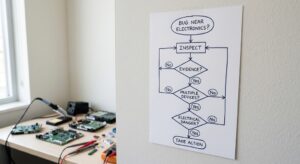
Found an ant, cockroach, or another insect near your computer, gaming console, router, TV, or appliance?
Don’t panic—and don’t spray the device.
Use this quick decision guide to determine your next step.
See a Single Bug Near Your Electronics?
→ Inspect the surrounding area.
One insect does not necessarily mean it has entered the device. Check underneath and behind the equipment, along baseboards, around furniture, and near food or moisture sources.
Next step: Clean the surrounding area and monitor for additional activity.
Seeing Repeated Pest Activity Around the Same Device?
→ Look for evidence of a larger problem.
Check the surrounding area for:
- Cockroach droppings
- Shed insect skins
- Egg cases
- Food residue
- Moisture
- Clutter or hiding places
- Cracks and gaps
- Repeated activity around vents or openings
Next step: Determine whether the activity is limited to the area around the device or extends throughout the room.
⚠️ Finding Evidence Around Vents, Ports, or Openings?
→ Treat this as a stronger warning sign.
Repeated insects, droppings, or other pest evidence around openings may indicate that insects are entering or hiding inside the equipment.
Next step: Turn the equipment off and disconnect it from power when it is safe to do so. Do not spray insecticide, pour liquid, or insert objects into the device.
If internal inspection is necessary, consider having the equipment evaluated by a qualified technician.
Finding Pests Around Multiple Electronic Devices?
→ Look for a broader household infestation.
When ants or cockroaches are appearing around several devices, the electronics may not be the source of the problem. The pests may already be established elsewhere in the room or home.
Next step: Inspect kitchens, bathrooms, cabinets, plumbing areas, storage spaces, appliances, and other common pest hiding areas.
If activity is widespread or persistent, consider professional pest control.
Smelling Something Burning or Seeing Electrical Damage?
→ Stop using the equipment.
Burning odors, smoke, sparks, melted components, damaged wiring, overheating, or unusual electrical behavior should never be treated as an ordinary pest problem.
Next step: Stop using the equipment and seek appropriate professional assistance. Do not spray the device or attempt an internal repair unless you are properly qualified to do so.
Is the Equipment Expensive or Difficult to Replace?
→ Avoid unnecessary DIY disassembly.
A valuable gaming console, computer, appliance, or other electronic device may not be worth the risk of damaging while trying to locate a hidden insect.
Next step: Disconnect the equipment when appropriate and consider having it professionally inspected.
The Quick Decision Path
Bug near electronics?
↓
Inspect the surrounding area.
↓
Repeated activity?
→ Look for droppings, shed skins, egg cases, food, moisture, and hiding places.
↓
Evidence around openings?
→ Disconnect the equipment when safe and do not spray inside it.
↓
Multiple devices affected?
→ Investigate for a broader household infestation.
↓
Electrical damage, smoke, sparks, overheating, or burning odor?
→ Stop using the equipment and seek professional help.
The Bottom Line
Don’t treat the electronics as the pest-control target.
In most situations, the safer approach is to identify and control the pest activity around the equipment, while protecting the electronic device from chemicals, liquids, excessive moisture, and unnecessary disassembly.
When the problem involves electrical damage or dangerous internal components, let the appropriate professional handle the equipment.
Common Mistakes Homeowners Make
Mistake 1: Spraying the Device
This can damage equipment and create unnecessary hazards.
Mistake 2: Treating Only the Device
The surrounding infestation may remain.
Mistake 3: Ignoring Food Sources
Crumbs and spills can keep pests coming back.
Mistake 4: Ignoring Moisture
A leak can support ongoing pest activity.
Mistake 5: Assuming One Dead Pest Means Success
There may be many more hidden nearby.
Mistake 6: Opening Dangerous Equipment
Some electronics contain components that can present serious electrical hazards.
Mistake 7: Moving an Infested Device Everywhere
This can potentially spread insects to other areas.
Frequently Asked Questions
Can cockroaches get inside gaming consoles?
Yes. Cockroaches can sometimes enter through ventilation openings and other gaps, particularly when there is an established infestation nearby.
Can ants get inside laptops?
Yes. Ants may enter through small openings while searching for food, moisture, warmth, or shelter.
Should I spray bug killer inside a gaming console?
No. Do not spray insecticide into the console. Address the surrounding pest problem and follow the manufacturer’s instructions.
Can cockroaches damage electronics?
They can potentially contribute to contamination and equipment problems, particularly during significant infestations, but not every pest sighting results in equipment damage.
Why do cockroaches like warm electronics?
Warm electronics can provide a protected environment. The device’s warmth is only one factor; surrounding food, moisture, shelter, and pest activity also matter.
Can a Wi-Fi router attract ants?
A router may provide warmth and shelter, but repeated ant activity should prompt an inspection of the surrounding environment.
Should I throw away electronics with cockroaches inside?
Not automatically. Depending on the equipment and extent of infestation, professional inspection or servicing may be worthwhile.
Can I vacuum pests out of electronics?
Avoid improvising by inserting a vacuum nozzle into sensitive equipment. Follow manufacturer instructions or seek professional service.
How can I keep cockroaches out of electronics?
Keep food and moisture sources under control, reduce clutter, monitor pest activity, and address any existing infestation.
Do electronics cause cockroach infestations?
Usually, the electronic device isn’t the root cause. It may simply provide another hiding location for pests already present.
What should I do if ants are inside a power strip?
Stop using it if it is safe to do so, avoid spraying it, and consider replacing it or having it professionally inspected.
Can pest-control products be used around electronics?
Some products may be appropriate for nearby surfaces when used exactly according to their labels. Never assume a product is safe for direct application to electronics.
Related BugOffControl Guides
For more detailed help with specific pest-and-electronic situations, explore these related resources:
Cockroaches & Appliances
- How to Get Rid of German Cockroaches in Gaming Consoles
- How to Get German Cockroaches Out of a Microwave
- How to Get German Cockroaches Out of a Coffee Maker
- How to Get Rid of German Cockroaches in Your Refrigerator
- How to Get Rid of German Cockroaches in Your Car
Ants & Electronics
- How to Keep Ants Away From Your Computer Desk
- How to Get Ants Out of a Laptop
- How to Get Ants Out of a Wi-Fi Router
- How to Get Ants Out of a Security Camera
- How to Keep Ants Out of Power Strips
- How to Keep Ants Out of a TV
- How to Get Ants Out of a Gaming Console
As these supporting guides grow, they can provide more detailed instructions for individual devices while this page serves as the central reference.
The Complete Electronics Pest Decision Guide
If you aren’t sure what to do, use this simple process:
You see one insect near an electronic device
→ Clean the surrounding area and monitor.
You repeatedly see insects around the device
→ Investigate the surrounding environment and look for the source.
You see insects emerging from the equipment
→ Stop using the equipment and avoid spraying inside it.
You find pest evidence around several devices
→ Investigate for a broader household infestation.
The device is malfunctioning
→ Have the equipment professionally inspected.
There is damaged wiring, burning odor, smoke, or another electrical hazard
→ Stop using the equipment and seek qualified professional assistance.
The Big Takeaway
Pests inside electronics can be disturbing, especially when the device is expensive or essential to your everyday life. But the answer isn’t to panic, spray chemicals into the equipment, or immediately throw the device away. The smarter approach is to think about the whole environment.
Protect the device.
Identify the pest.
Look for food and moisture.
Inspect the surrounding area.
Monitor activity.
Address the infestation at its source.
And if the equipment itself may be damaged or unsafe, let a qualified electronics professional handle the device. The most important thing to remember is that a gaming console, laptop, router, television, microwave, or refrigerator may simply be one hiding place within a larger pest problem.
Find and correct the conditions supporting that pest activity, and you have a much better chance of protecting both your electronics and your home.
A Shareable Reference: 10 Rules for Protecting Electronics From Pests
1. Keep food away from electronics.
2. Clean crumbs and spills quickly.
3. Control moisture and repair leaks.
4. Reduce clutter around equipment.
5. Monitor repeated pest activity.
6. Don’t spray insecticide inside electronics.
7. Don’t pour liquids into electronic equipment.
8. Investigate the surrounding pest source.
9. Stop using equipment showing signs of electrical damage.
10. Use qualified professionals when the problem exceeds safe DIY control.
Why This Guide Matters
Pest problems involving electronics are often treated as if they are simply an equipment problem. They’re not always. The more useful question is:
What conditions allowed the pest to reach the device in the first place? That question changes the entire approach.
Instead of repeatedly removing individual insects, you can look at the food, moisture, shelter, clutter, entry points, and pest activity surrounding the equipment. That’s how you move from simply reacting to a pest sighting toward preventing the next one.
About Bug Off Control
Bug Off Control | DIY Pest Control Solutions for Home & Garden
BugOffControl.com provides practical, research-based information to help homeowners identify, prevent, and manage common household and garden pest problems.
Our guides are designed to explain pest behavior, control options, prevention methods, and product information in straightforward language.
For pesticide use, always read and follow the product label. When electrical hazards, serious infestations, or equipment repairs are involved, use an appropriately qualified professional.